
How to Enable Always Online on GB WhatsApp
People find it hard to stay active on GB WhatsApp due to busy schedules but still want to appear always online to others. While, they try to enable always online feature, but they often face difficulties finding the option to enable it.
No worries, we’ll help you enable always online on GB WhatsApp with ease. First of all, open app → go to GBSettings → click Universal → click Settings → tap “Always Online” toggle to enable it. Let us take a look at step-by-step procedure of enabling always online feature below.

Steps to Enable Always Online Feature on GB WhatsApp
Some steps that will help you enable always online feature on GB WhatsApp are given below:
Step 1: Click 3 dots in GB WhatsApp upper right corner and navigate to the “GBSettings”.
Step 2: Click the “Universal” option in the GBSettings.
Step 3: Click the “Settings” option that is below the “Backup and Restore” option. You can also check out the image that is given below.
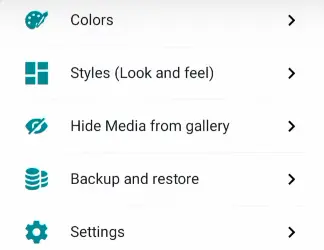
Step 4: Scroll down and here you’ll find an option “Enable Always Online”. Simply tap toggle to enable it, by doing that always online status will be activated in your GB WhatsApp.

This article was about how to enable always online feature. We’ve described step-by-step procedure and you can enable always online feature without any hassle. In case of any queries, please feel free to leave a comment.