
Many people want to change GB WhatsApp home screen wallpaper and set their own because it looks cool. You might have captured a photo of yourself and wished to set it as your home screen wallpaper by changing the default one.
Don’t worry because we came up with an easy method of changing the home screen wallpaper of GB WhatsApp. To change home screen wallpaper, click on GBSettings option > Universal > Colors > Background > Photo > choose your favorite photo from gallery > Set Wallpaper. Let’s describe the method of changing the home screen wallpaper of GB WhatsApp in detail below.
Steps to change GB WhatsApp home screen wallpaper
There are simple steps through which you can change the home screen wallpaper of your GB WhatsApp.
Step 1: First of all, launch GB WhatsApp on your mobile.
Step 2: Click on 3 dots of your GB WhatsApp and then click the GBSettings option.
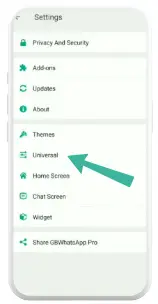
Step 3: After opening the GBSettings option click on the universal option.
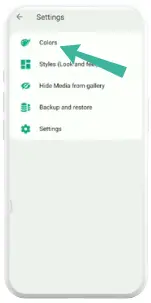
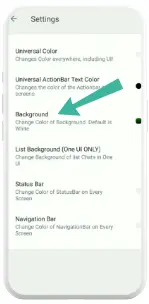
Step 4: Now you’ll have to click the colors option, scroll down and click the background option and then tap photo under more options to select image from your mobile’s gallery.
Step 5: After choosing your favorite image click set wallpaper. As you’ll click on the set wallpaper your home screen wallpaper of GB WhatsApp will be changed.
You can’t change your official WhatsApp home screen wallpaper as this feature is currently not available. However in GB WhatsApp you can change home screen wallpaper. To do that follow the steps below.
- Open GB WhatsApp and click on 3 dots > GBSettings > Universal > Colors > Background > Photo > Set Wallpaper.
If the home screen wallpaper of your GB WhatsApp is not changing then follow steps below.
- Open your mobile phone settings > Apps > GB WhatsApp > Storage > Clear Cache.
After clearing the cache of your GB WhatsApp try to change the home screen wallpaper again. We hope this will fix the problem of the home screen wallpaper not changing.
Yes. You can change the home screen wallpaper of GB WhatsApp. The method of changing home screen wallpaper in GB WhatsApp is so simple.
This article was about the method of changing the home screen wallpaper of GB WhatsApp. Still if the home screen is not changing in your GB WhatsApp, feel free to comment on the problem in the comment section below.